
01 / REORDER POLICY
Set the reorder point from pace and lead time.
Keep sales velocity, lead time, safety stock and service level at product level, with supplier minimums in the same working context.
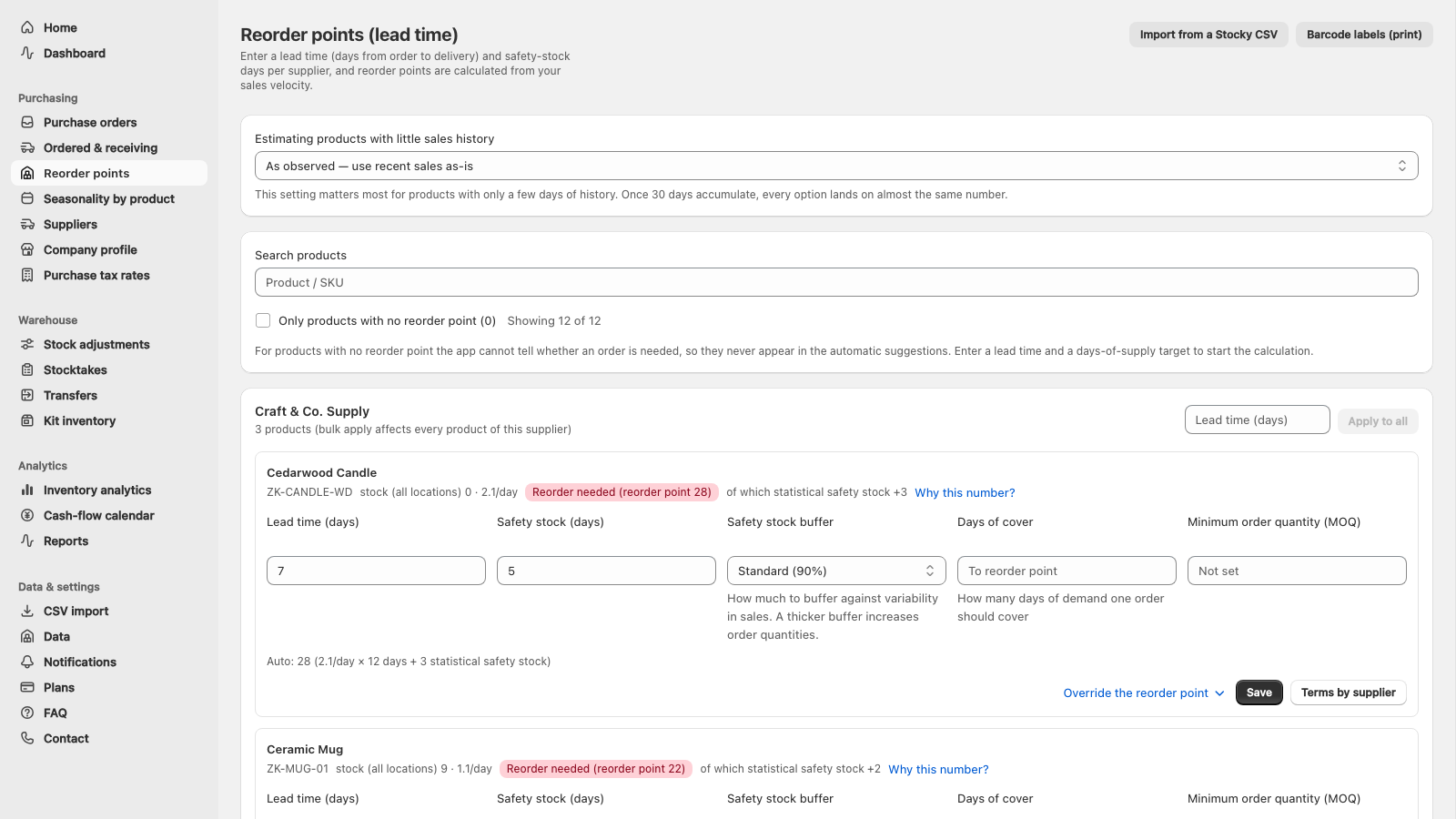
Shopify inventory planning and purchase orders
For Shopify stores that buy physical products from suppliers: on Starter and above, UreyukiBox suggests reorder points and quantities using your sales pace, supplier lead time, stock on hand, inbound stock and open UreyukiBox orders.
Check the quantity and supplier before emailing a purchase order. Confirm what actually arrived before recording a receipt.
The interface and support are available in English. Start on Free with 100 products and 1 location, create manual purchase orders and record receipts. No charge while you stay on Free. See what Free covers
ORDER TO RECEIVING
On Starter and above, UreyukiBox calculates shortages and suggests order quantities from sales pace, lead time, safety stock, on-hand and inbound stock, and open in-app orders. You review the supplier and quantities before emailing the purchase order, then confirm what physically arrived before recording the receipt.
Sync Shopify stock, sales and inbound
UreyukiBox
Suggest the shortage and order quantity
UreyukiBox
Review the supplier, quantities and copy
Merchant review
Email the PO and mark it ordered
Merchant review
Confirm what arrived
Merchant review
UreyukiBox performs 01–02; you review and carry out 03–05. Open quantities marked as ordered are subtracted from the next suggestion.
See the full scope ↘THE WORK, ON SCREEN
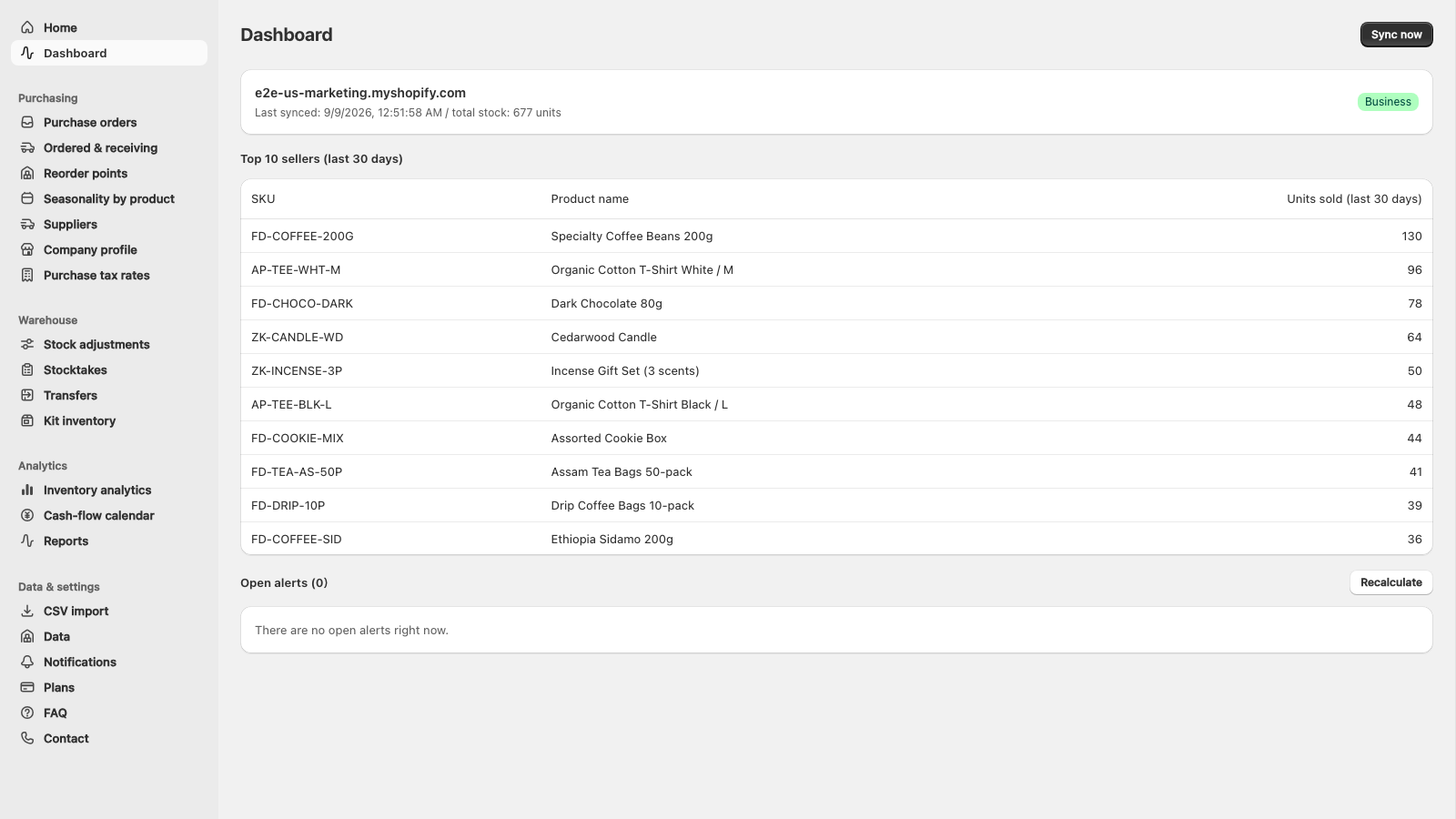
Reorder policy, purchase order and receiving stay connected around the same products and suppliers.
01 / REORDER POLICY
Keep sales velocity, lead time, safety stock and service level at product level, with supplier minimums in the same working context.
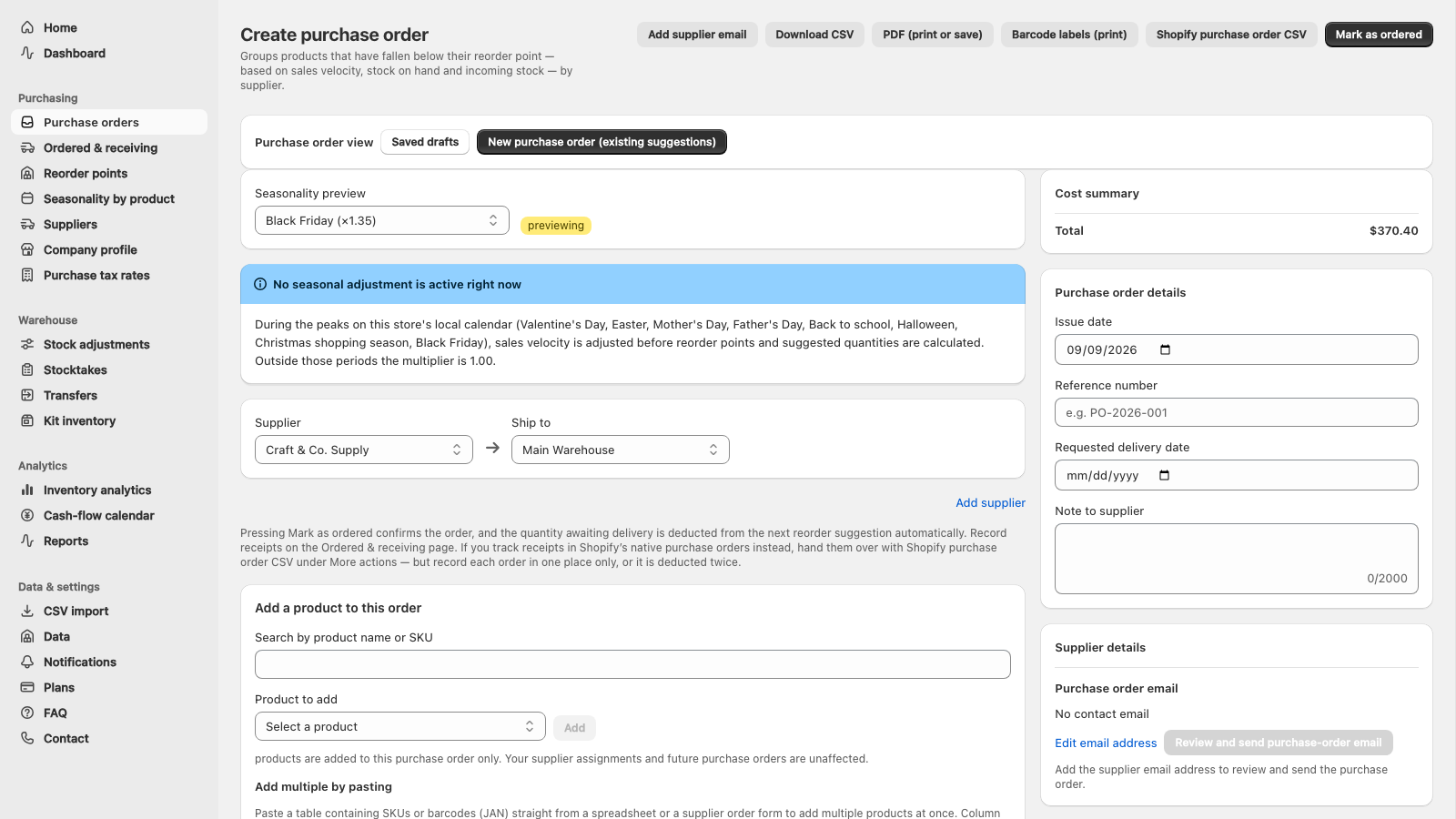
02 / PURCHASE ORDER
Group lines by supplier, check the tax split and total, then reuse the same order for PDF, CSV and supplier email.
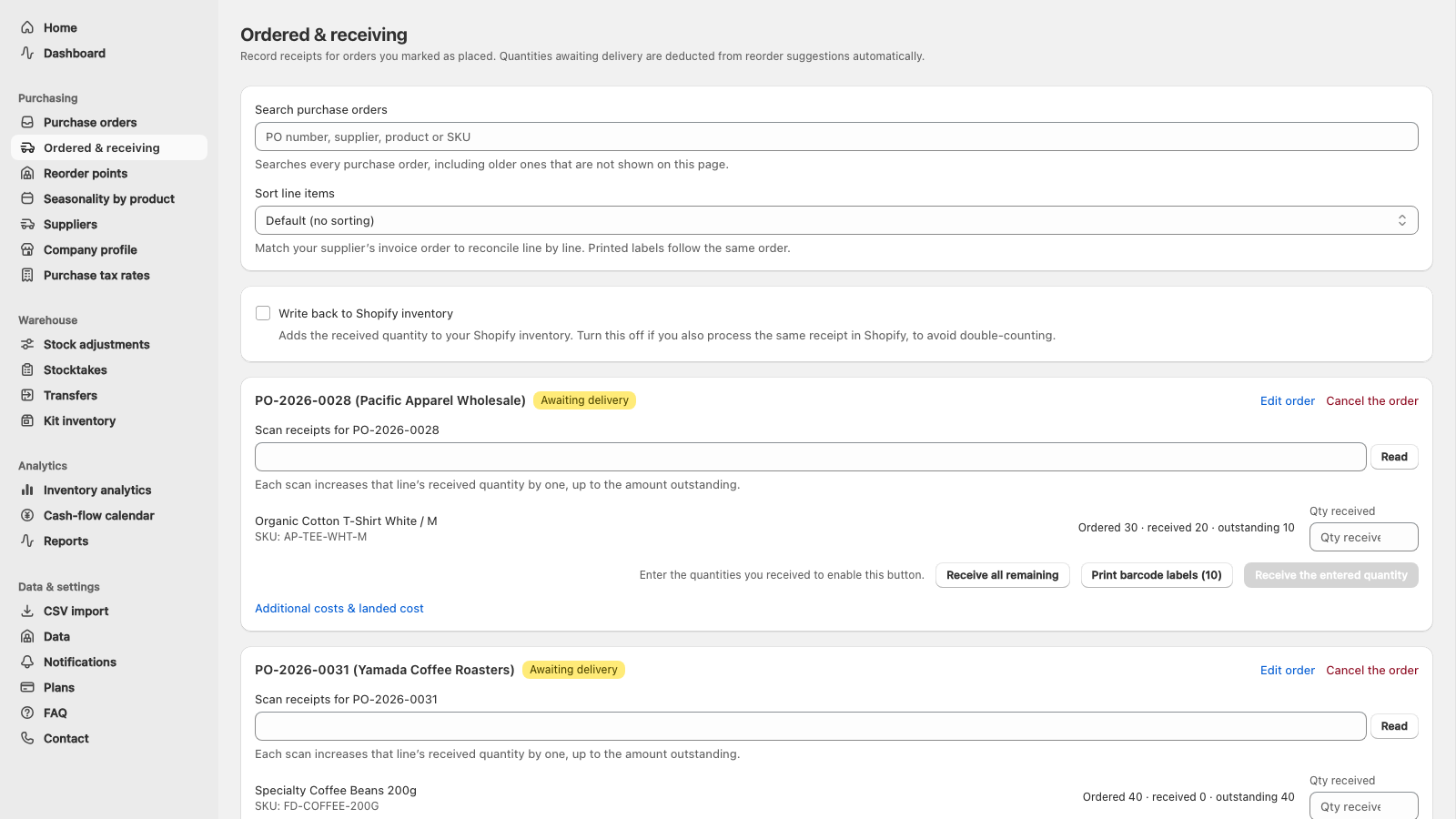
03 / RECEIVING
Record full or partial receipts after checking the delivery. Shopify write-back is explicit, avoiding a second inventory update elsewhere.
PRODUCT SCOPE
Plan the next supplier order from your Shopify data, then keep the purchase order and receiving in one workflow. UreyukiBox runs in Shopify admin; syncing alone never rewrites your stock. If you used Stocky, import of saved supported data is available too.
On Starter and above, UreyukiBox suggests reorder points and quantities from sales pace, lead time, safety stock, on-hand and inbound stock, and open in-app orders. Review the supplier and quantities before emailing the purchase order; receiving remains a human confirmation.
CSV import in UreyukiBox has two tabs: Through Aug 31 and Sep 1 onward. On Sep 1 onward, select manifest.json and all eight CSV files from Shopify’s official Stocky export together, review the preview, then import the supported data. Through Aug 31 keeps the existing CSV and paste workflow unchanged. Neither route infers missing fields or changes current Shopify inventory, transfers, product catalogue, or tax settings. Stocky data already saved in UreyukiBox remains available in Data, including supported CSV and PDF exports.
Seasonal timing comes from your store’s country calendar: Thanksgiving and Black Friday, Christmas, Boxing Day, Mothering Sunday, the French soldes, Japanese gift seasons — 51 country calendars in total. The calendar does not need a year of history, but quantities still use evidence from your store’s sales; where there is no basis, the app produces no number.
Set a reorder point per variant — or derive it from your own sales pace, lead time, safety stock and target service level. When available stock reaches the point, Starter can alert by email; Slack and LINE start on Pro.
Draft purchase orders arrive with a suggested quantity: target stock minus current and Shopify-inbound stock, minus open quantities marked as ordered in UreyukiBox. Do not record the same physical order in both sources, because both are subtracted.
Store supplier-specific lead times, minimum order quantities, cost prices and several suppliers per SKU. The preferred supplier’s minimum and pack size can round a drafted quantity; reorder lead time stays in the product’s reorder policy.
Export a PO as PDF or CSV, or email it straight to the supplier. Mark it as ordered, then receive part or all of it — and optionally push the received quantity back to Shopify inventory. The document follows your store: totals are in your store’s currency, with editable purchase-tax presets for 53 countries. The US, Canada, Brazil, Hong Kong, Indonesia and Malaysia start with no tax line because one national rate would be misleading.
Stock adjustments with reason codes, stocktakes and cycle counts, barcode scanning and barcode label printing — all writing back to Shopify only when you act. Transfers between locations require Business.
Stock valuation, ABC classification, dead stock, a cash-flow calendar projecting when each draft order gets paid for, and a bill of materials showing how many kits you can assemble.
Allocate freight, duties and clearing fees across a receipt — by quantity or by value — to get a true landed cost per item. Margin and per-supplier performance come as on-screen reports and CSV exports (Pro plan and above).
Pricing
Free has no time limit — stay on it and you are never charged. Supported CSV and paste imports for saved Stocky data, manual purchase orders, and receiving all sit inside the free plan.
Paid plans come with a 14-day free trial per store, and you can cancel back to Free at any time.
STOCKY MIGRATION
Import the nine-file official Stocky export on the Sep 1 onward tab, or keep using the unchanged legacy workflow for files saved through Aug 31.
Keep manifest.json and the eight CSV files together with their original names. Also preserve any legacy CSV files and copied tables saved through Aug 31.
Sync current products, inventory, and orders from Shopify so imported records can be checked against the current catalogue. Syncing alone does not move Stocky history.
CSV import in UreyukiBox has two tabs: Through Aug 31 and Sep 1 onward. On Sep 1 onward, select manifest.json and all eight CSV files from Shopify’s official Stocky export together, review the preview, then import the supported data. Through Aug 31 keeps the existing CSV and paste workflow unchanged. Neither route infers missing fields or changes current Shopify inventory, transfers, product catalogue, or tax settings.
Stocky data already saved in UreyukiBox remains available in Data, including supported CSV and PDF exports. The official importer checks missing, duplicate, and unknown files before import. Keep the complete original export as the source of truth for unsupported fields.
If you need help with migration, contact us .
PRESS / REVIEW
Articles about UreyukiBox published by external media. These are written in Japanese.
Tsun Inc. August 4, 2026
A guest article on the Japanese e-commerce media Tsun: preparing for the Stocky shutdown, how reorder points work, and the flow from purchase orders through receiving and stocktakes.
Read the article →Tsun Inc. August 4, 2026
A roundup of Shopify apps that support Japanese stores. UreyukiBox is featured in the inventory management section.
Read the article →株式会社UnReact March 26, 2025
A Japanese roundup of 20 Shopify inventory apps featuring UreyukiBox for its Japanese support, demand forecasting, purchase orders, and Stocky migration.
Read the article →FIELD NOTES / INVENTORY
Learn how to set Shopify reorder points and plan purchase orders. Replacing Stocky? Compare Shopify’s native tools and check which saved export files you can bring across.
Current field notes
Shopify incoming inventory vs open purchase orders: avoid double ordering
See why an ordered supplier PO and Shopify incoming inventory can show different quantities, and check open orders before creating another reorder.
How to export your Stocky data
Keep manifest.json and all eight CSV files from Shopify’s official Stocky export together, with legacy pre-shutdown files stored separately.
What happened to your Stocky data
What remains in Shopify, what belongs in the official nine-file export, and what is not moved automatically.
Import the official Stocky export
Use Sep 1 onward for Shopify’s manifest plus eight CSV files, or Through Aug 31 for saved legacy CSV and copied-table sources.
KEEP THE LINK
We will email you the install link and the current offer terms.
Guidance email sent
We sent the install link and campaign terms. If it does not arrive, please check your spam folder.
Already registered
We already sent the guidance email to this address. If it is not in your spam folder, contact us below. You can also continue directly to installation.
support@ureyukibox.appQUESTIONS / ANSWERS
Yes. Connect your Shopify store to sync products, inventory and orders; Stocky is not required. On Free you can make manual purchase orders and record receipts. Starter adds reorder-point and quantity suggestions, plus reviewed purchase orders emailed to suppliers. Saved Stocky data import is available if you need it.
No. On Starter and above, it can suggest reorder points and order quantities, but you review the supplier, quantities and message before sending. Open quantities marked as ordered are subtracted from the next suggestion. You also confirm what physically arrived before recording the receipt.
Yes. UreyukiBox is a Stocky alternative for Shopify inventory management, inventory forecasting, reorder points, suppliers, purchase orders, receiving, stocktakes, and reports. Stocky migration is optional. CSV import in UreyukiBox has two tabs: Through Aug 31 and Sep 1 onward. On Sep 1 onward, select manifest.json and all eight CSV files from Shopify’s official Stocky export together, review the preview, then import the supported data. Through Aug 31 keeps the existing CSV and paste workflow unchanged. Neither route infers missing fields or changes current Shopify inventory, transfers, product catalogue, or tax settings. Stocky data already saved in UreyukiBox remains available in Data, including supported CSV and PDF exports.
Free has no time limit, and you are never charged while you stay on it. It covers product, inventory and order sync from Shopify (read-only), supported CSV and paste imports for saved Stocky data, purchase orders exported as PDF or CSV, receiving including part-shipments, stock adjustments with reason codes, and the dashboard. The limits are 100 products and 1 location, with 7 days of sales history (30 days on Pro and above). Reorder points, drafted order quantities, stocktakes, email low-stock alerts and emailing a purchase order to the supplier start on Starter; LINE and Slack alerts, inventory analytics, landed cost and reports start on Pro; transfers between locations require Business.
Yes. The interface is in English when your Shopify admin is set to English, and support is available in English. Anything we generate for a store outside Japan — reorder alerts by email, Slack or LINE, purchase orders sent to suppliers, and import messages — comes in English too. Supported CSV and paste imports can be used regardless of store language or country. Purchase orders follow your store’s currency and editable purchase-tax settings.
Yes. Keep the original Stocky exports and copied tables even after importing them. UreyukiBox accepts only the formats shown in CSV import, so the independent originals remain the source of truth for unsupported fields.
Open CSV import and choose the tab that matches when the source was exported. CSV import in UreyukiBox has two tabs: Through Aug 31 and Sep 1 onward. On Sep 1 onward, select manifest.json and all eight CSV files from Shopify’s official Stocky export together, review the preview, then import the supported data. Through Aug 31 keeps the existing CSV and paste workflow unchanged. Neither route infers missing fields or changes current Shopify inventory, transfers, product catalogue, or tax settings. Stocky data already saved in UreyukiBox remains available in Data, including supported CSV and PDF exports. Import runs on the free plan.
UreyukiBox retains note columns that are present in a supported CSV or copied table and handled by the import screen. It cannot infer a note that is absent from the file. Keep an independent copy of every note you need.
Shopify’s native inventory tools are free: they create and receive purchase orders, manage suppliers, use Flow for low-stock alerts, and Sidekick can recommend items and draft an order from sales data. UreyukiBox is for merchants who need the policy to be persistent and automatic: reorder points calculated from lead time and safety stock, supplier-specific MOQs and lead times that feed the quantity, scheduled email/Slack/LINE alerts, and purchase orders emailed directly to suppliers.
Four tiers including a free one: Free (free), Starter (¥2,980/mo), Pro (¥5,980/mo), Business (¥12,800/mo). Billing goes through Shopify: stores billed in Japanese yen pay the yen price, and stores billed in any other currency pay the US-dollar price shown in the app (Starter $19, Pro $39, Business $83). The standard paid-plan trial is 14 days total per store; changing plans or resubscribing uses only the days left.
Syncing is read-only — the app never rewrites your stock on its own. Quantities change only when you carry out one of four actions yourself: receiving a purchase order, making a stock adjustment, applying a stocktake, or moving stock between locations. If you already receive stock elsewhere, you can turn the receiving write-back off so quantities are not counted twice.
No. Forecasting and reorder points currently read your Shopify sales only. If you also sell on other marketplaces, the suggested quantities will understate total demand for those products — override their reorder points manually to allow for the other channels. External-channel sales import is not supported, and no delivery date is promised.
No. UreyukiBox currently runs inside the Shopify admin, with no POS screen, and no delivery date is promised. The floor workflows a POS surface would expose — stocktakes, receiving, stock adjustments and barcode scanning — already exist in the admin app today.